You build a data import feature. Your schema expects an 'email' field. A user uploads a CSV with a column called 'Email Address'. Your import breaks. You fix that case. Next week, another user uploads a file with 'E-Mail', 'correo_electronico', or just 'col_3'. The import breaks again. This is the column mapping problem, and it sits at the intersection of human inconsistency and rigid systems.
Column mapping is the process of matching columns in a user-supplied file to fields in your application's data schema. It sounds trivial. In practice, it is one of the most brittle parts of any data import pipeline.
1What Is CSV Column Mapping?
When a user uploads a CSV or Excel file, the file has its own column headers — names chosen by whoever created the spreadsheet. Your application has a target schema — a defined set of fields with specific names, types, and validation rules. Column mapping is the bridge between those two worlds.
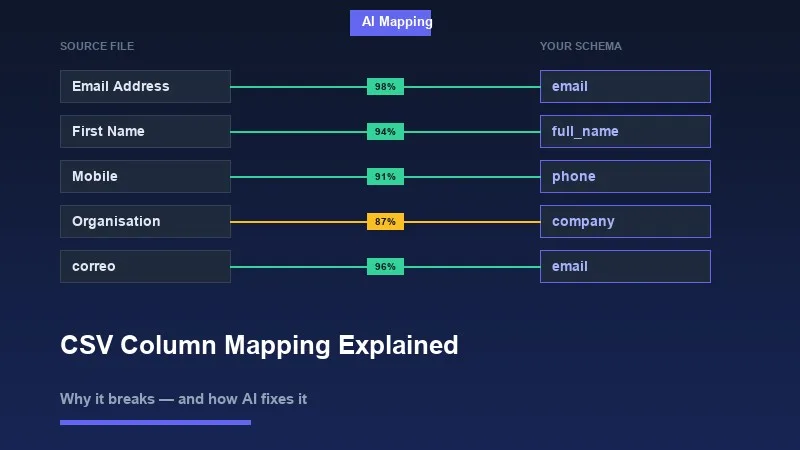
For a contact import, your schema might expect: 'first_name', 'last_name', 'email', 'phone', 'company'. The user's spreadsheet might have: 'First Name', 'Surname', 'Email Address', 'Mobile', 'Organisation'. Every one of those pairs is a mapping problem.
There are three approaches to solving it: ask the user to map manually, write deterministic rules, or use semantic/AI-based matching. Each has different tradeoffs in accuracy, maintenance cost, and user experience.
2Why Column Headers Are Inconsistent by Default
People name spreadsheet columns based on what makes sense to them, not what your API expects. There is no enforced naming convention for Excel files shared between teams, exported from third-party tools, or generated by legacy systems. This produces a wide range of real-world header patterns for the same underlying concept.
- ✓Capitalization variants: 'email', 'Email', 'EMAIL', 'E-Mail'
- ✓Spacing and delimiter variants: 'first_name', 'First Name', 'firstname', 'first-name'
- ✓Abbreviations: 'ph_no', 'mob', 'tel', 'ph' — all meaning phone number
- ✓Synonyms: 'company', 'organisation', 'employer', 'firm', 'business_name'
- ✓Multilingual headers: 'correo' (Spanish), 'courriel' (French), 'E-Mail-Adresse' (German) — all meaning email
- ✓CRM and tool-specific exports: Salesforce exports 'Account Name', HubSpot exports 'Company Name', your schema wants 'company'
- ✓Positional or unnamed headers: 'Column A', 'Field 1', or blank headers entirely
- ✓Truncated headers from spreadsheet limits: 'Telephone Number (Work)' becomes 'Telephone Number (W'
These are not edge cases. Users exporting data from Salesforce, Notion, Google Contacts, Shopify, or their own internal tools will produce all of these patterns regularly. If your import pipeline requires exact header matches, a significant fraction of your uploads will fail or require manual intervention.
3How Manual Mapping Works and Where It Fails
The standard fallback is to show users a mapping UI: display their column names on the left, your schema fields on the right, and let them connect the dots with dropdowns or drag-and-drop. This shifts the burden of the mapping problem from your system to your user.
Manual mapping works if your users are technical and uploading files they understand. It fails in most real-world scenarios.
- ✓Non-technical users do not know what 'schema field' means or which of their columns maps to 'external_id'
- ✓Files with 30+ columns require mapping 30+ dropdowns — users abandon the import
- ✓Users doing recurring imports resent remapping the same columns every time
- ✓When the mapping UI is unclear, users guess wrong, and corrupted data reaches your database silently
- ✓Support tickets spike every time you add a required field to your schema
💡 Pro tip
Import abandonment is rarely tracked carefully, but teams that instrument their import funnels consistently find that the column mapping step has the highest drop-off rate. A 40-column spreadsheet with no auto-mapping is a form with 40 required fields.
Even when users complete the manual mapping, errors slip through. A user maps 'Mobile' to 'phone' but your schema also has 'phone_mobile' and 'phone_work' as separate fields. They pick one. Half the data ends up in the wrong place. Nobody notices until a report looks wrong three weeks later.
4Rule-Based Matching and Its Limits
The first engineering instinct is to write matching rules: normalize both strings to lowercase, strip spaces, and do an exact match. That handles 'Email' vs 'email'. Then you add fuzzy matching to catch typos. Then you maintain a synonyms dictionary: 'phone' maps to 'telephone', 'mobile', 'cell'. Then you add language translations. You are now maintaining a growing lookup table that will never be complete.
Rule-based approaches have a specific failure mode: they work well on the data you tested them with and fail unpredictably on data you have not seen. When they fail, they fail silently — a confident wrong match is worse than no match, because your pipeline ingests bad data without errors.
- ✓String normalization catches capitalization and whitespace but not synonyms or abbreviations
- ✓Levenshtein distance catches typos but confuses 'name' with 'fame' and 'phone' with 'prone'
- ✓Synonym dictionaries require manual curation and miss domain-specific, industry-specific, or locale-specific terms
- ✓Regex patterns for known formats (phone numbers, emails) can validate values but not identify which column contains them
- ✓Heuristics built on column position ('first column is probably the name') break with any non-standard file structure
The combinatorial space is too large for hand-written rules. A phone number column might be labeled in any of dozens of ways across the files your users upload. A rules engine that handles your current top 10 patterns will still miss the next 50.
5What AI-Based Column Mapping Actually Does
Semantic column mapping uses the same underlying technology as modern search and language understanding: vector embeddings. The idea is to represent both the column header (and optionally sample values from that column) as a vector in a high-dimensional space, then find the schema field whose vector is closest.
In this space, 'Email Address', 'correo_electronico', 'E-Mail', and 'email' all land near each other — because models trained on large text corpora understand that these phrases refer to the same concept. The distance between 'ph_no' and 'phone_number' is small. The distance between 'ph_no' and 'last_name' is large.
Semantic matching does not look for string similarity. It looks for meaning similarity. That is the difference between matching 'mob' to 'mobile_number' versus matching it to 'model'.
A practical implementation combines several signals to produce a confidence score for each candidate match: the column header text itself, a sample of values from that column, the data type inferred from those values, and the position of the column in the file. A column with the header 'ph' containing values like '+1-555-867-5309' and '+44 20 7946 0958' is almost certainly a phone number field.
- ✓Header embedding: semantic similarity between the header string and schema field names/descriptions
- ✓Value sampling: inspect 5-10 rows of actual data to infer data type and format
- ✓Format pattern matching: detect emails, phone numbers, dates, currencies from value structure
- ✓Confidence thresholding: only auto-apply matches above a confidence threshold; surface low-confidence matches for user review
- ✓User correction learning: when a user overrides a mapping, use that signal to improve future suggestions for similar files
The confidence score is critical. A good AI mapping system does not just make its best guess — it expresses uncertainty. A match with 95% confidence can be applied automatically. A match at 62% should be flagged for the user to confirm. This gives you the efficiency gains of automation without silently ingesting wrong data.
6The UX Layer: Showing Mappings to Users
Even with AI-generated suggestions, you need a UI that lets users review, confirm, and override. The goal is not to remove humans from the loop entirely — it is to reduce the cognitive load to reviewing suggestions rather than doing all the work manually.
A well-designed mapping UI does the following: auto-maps high-confidence matches, highlights unmatched or low-confidence mappings in a distinct visual state, shows sample values from the source column so the user can verify the match makes sense, and makes it easy to change a mapping with a single interaction.
- ✓Show source column name AND a few sample values side by side with the matched schema field
- ✓Distinguish between auto-mapped (high confidence), suggested (medium confidence), and unmapped (no good match) states
- ✓Allow users to mark schema fields as optional so imports can proceed with partial data
- ✓Persist mapping templates so recurring uploads from the same source do not require re-mapping
- ✓Provide clear error messages for required fields that have no match, not a silent failure
💡 Pro tip
A mapping interface that surfaces confidence levels builds user trust. When users see that 95% of their columns were matched automatically and only 2 need review, the task feels manageable. When they see 30 dropdowns all defaulting to 'Select a field', they close the tab.
7Implementing Column Mapping Without Building It from Scratch
Building a production-quality column mapping system — file parsing, schema validation, semantic matching, confidence scoring, a review UI, error handling, and format support across CSV, XLSX, XML, and Google Sheets — is several months of engineering work. It is also not your core product.
Most teams underestimate this. The first version of a DIY importer handles the happy path. The next six months are spent fixing encoding issues in Excel files, handling merged header rows, dealing with BOM characters in UTF-8 CSVs, and writing custom rules for every new column naming pattern a user reports.
Xlork's data importer is built specifically around this problem. It handles multi-format file parsing and uses AI-powered semantic column mapping to match source headers to your defined schema — including support for multilingual headers, abbreviations, and value-based inference. The mapping UI surfaces confidence scores, shows sample values, and lets users confirm or override matches before any data is written. You define your target schema; Xlork handles the matching and review workflow.
If you want to see how the schema definition and column mapping configuration works in practice, the Xlork documentation at xlork.com/docs walks through the full SDK setup, including how to define required vs. optional fields, set confidence thresholds, and handle mapping overrides.
8The Actual Cost of Getting This Wrong
Bad column mapping produces bad data. Bad data is not just an import problem — it propagates through your system. Wrong phone numbers in a CRM mean sales reps call the wrong contacts. Misaligned price columns in a product catalog mean customers see incorrect pricing. A name field mapped to an email column means your emails fail to send and your database has garbage in a critical field.
The downstream cleanup cost of a bad import usually far exceeds the cost of building a good import UI. Data that enters your system through a broken mapping is hard to identify and hard to fix, because it looks like valid data — it just means the wrong thing.
- ✓Silent data corruption: wrong column mapped, correct data type, no validation error — bad data passes through undetected
- ✓User trust erosion: when users discover their import produced corrupted records, they lose confidence in the entire product
- ✓Support load: every import failure and mapping question becomes a support ticket
- ✓Engineering time: reactive fixes to import edge cases compound over time into a large, poorly-tested codebase
9Summary
Column mapping is the step where a user's real-world data meets your application's expected schema. It breaks because humans name things inconsistently, tools export data in different formats, and the space of possible column headers for any given concept is effectively unbounded.
String matching handles the easy cases. Rule-based systems extend coverage but require constant maintenance and fail unpredictably. Semantic AI mapping — using vector embeddings trained on large corpora — handles synonyms, abbreviations, multilingual headers, and value-based inference in a way that scales without ongoing manual curation.
Whatever approach you use, the UX layer matters as much as the matching logic. Users need to see what was matched, understand why, and be able to correct mistakes before data is committed. Confidence scores, sample value previews, and clear required-field indicators are the difference between an import workflow that users complete and one they abandon.
💡 Pro tip
If you are building a data import feature and want to skip the parser, mapping engine, and review UI from scratch, review the Xlork SDK documentation at xlork.com/docs to see how schema definition and AI column mapping work in a real integration.