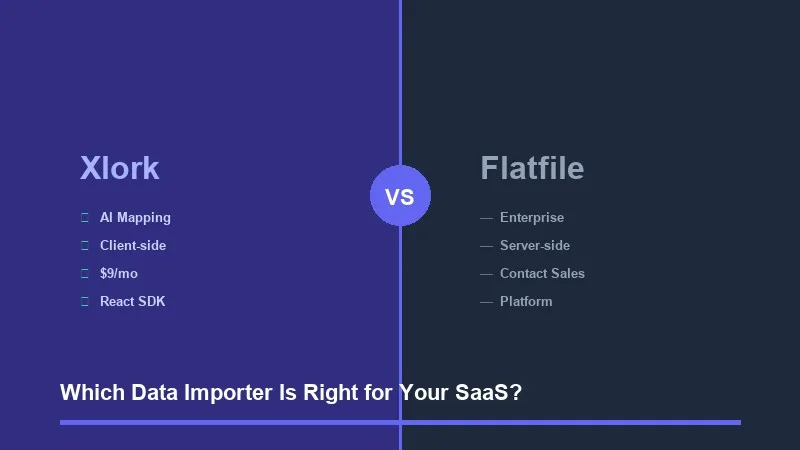
If you're building a SaaS product that needs to accept user-uploaded data, you've almost certainly landed on two names: Xlork and Flatfile. Both solve the same core problem — letting your users import CSV, Excel, and other file formats into your product without the pain of building a custom importer from scratch. But they take meaningfully different approaches, and choosing the wrong one can cost you weeks of re-implementation later. This comparison walks through every dimension that matters to a developer making this decision in 2026.
The short version: Flatfile is a mature, enterprise-grade platform with deep ecosystem integrations and a recognizable brand. Xlork is a developer-first importer with transparent pricing, AI-powered column mapping, and a faster path from npm install to production. Which one fits your situation depends on your team size, budget, and how much control you need over the import experience.
1Developer Experience and SDK
Flatfile's SDK has evolved considerably over the years. Their current Platform approach centers around a configuration-driven model where you define Spaces, Workbooks, and Sheets in a declarative config. The abstractions are powerful once you understand them, but the mental model takes time to internalize. Expect to spend a non-trivial amount of time reading their docs before your first import is working end-to-end.
Xlork's SDK is structured around a single React component or a Node.js client, depending on where you need the integration. The API surface is smaller by design. You pass in your schema, configure the importer options, and mount the component. Most developers get a functional importer running in under 30 minutes. The trade-off is that you have less built-in abstraction for complex multi-sheet workflows — but for the majority of SaaS import use cases, that trade-off is worth it.
- ✓Xlork React SDK: single component mount, schema-driven configuration, TypeScript support out of the box
- ✓Xlork Node.js SDK: server-side validation, transformation pipelines, webhook-ready event handling
- ✓Xlork REST API: language-agnostic integration for non-JS stacks
- ✓Flatfile SDK: declarative Space/Workbook model, rich plugin ecosystem, steeper initial learning curve
- ✓Flatfile also offers a React SDK and headless API, but the full feature set is tied to their platform config model
For a team shipping fast on a React or Next.js stack, Xlork's component-first approach removes friction. For a larger team managing complex multi-tenant workflows with custom plugins, Flatfile's architecture gives you more surface area to work with — assuming you're willing to invest in the setup time.
2AI-Powered Column Mapping
Column mapping is one of the hardest problems in data import UX. Your users upload a CSV where the column is called 'First Name', but your schema expects 'first_name'. Or worse, they have 'Given Name', 'Forename', 'Contact First', or no header row at all. A manual mapping interface shifts that cognitive burden onto your users. An intelligent mapping layer absorbs it.
Xlork uses semantic AI mapping that goes beyond string similarity. It understands that 'Mobile Number', 'Cell', 'Phone (mobile)', and 'WhatsApp' all likely map to a 'phone' field. The mapping engine considers field context, data patterns in the column values, and schema metadata to make accurate suggestions. You can configure confidence thresholds to auto-accept high-confidence matches and surface only the ambiguous ones for user review.
Flatfile also has column mapping capabilities and has been expanding their AI features. Their matching works well for straightforward cases. However, Xlork's AI mapping has been positioned as a core product capability from the start — it is a first-class feature, not an add-on. In practice, this means the mapping quality on edge cases, non-English column names, and domain-specific terminology tends to be stronger in Xlork.
💡 Pro tip
Xlork's AI column mapping is available on all paid tiers. You can test it against your actual schema in the free tier before committing. See the column mapping docs at xlork.com/docs/column-mapping for configuration options including confidence thresholds and manual override controls.
3File Format Support
Both platforms cover the standard formats. Where they differ is in the breadth of native support and how edge cases are handled.
Google Sheets direct import is a meaningful differentiator for Xlork. Many SaaS users manage operational data in Sheets and prefer to import directly rather than export a CSV first. Eliminating that friction reduces import abandonment. Flatfile can be configured to support this but it is not a zero-config capability.
4Pricing and Transparency
This is where the comparison becomes most concrete. Xlork publishes its pricing openly. Flatfile does not — their pricing page directs you to contact their sales team. For a developer evaluating tools on a Saturday afternoon, 'contact sales' is a dead end. It also signals that pricing is likely negotiated, which typically means it scales with your contract size, not your usage.
If you are a bootstrapped founder or a small engineering team, the ability to evaluate, trial, and pay for a tool without a sales conversation is a real quality-of-life difference. Xlork's $9 tier gives you a functional production importer. Flatfile's model is optimized for enterprise deals where a sales process makes sense — which is fine if that is your context, but mismatched if it is not.
Pricing transparency is not just a convenience — it directly affects your ability to build accurate cost models when planning a new product feature or estimating a client project.
5UI Customization and Embedding
Both platforms support white-labeled, embedded import experiences. The difference is in how much CSS and behavioral control you have without writing custom plugins.
Xlork's importer is designed to be embedded directly in your application with full theming via CSS variables and a configuration API for controlling which steps are shown, what copy appears, and how validation feedback is surfaced. You can match it to your product's design system without writing any plugin code.
Flatfile's platform offers deep customization through their listener and plugin architecture. You can customize nearly every aspect of the experience — but doing so requires writing listener code and understanding their event model. For teams that need maximum control and have the engineering bandwidth to invest, Flatfile's architecture is genuinely powerful. For teams that need a clean, on-brand import UI without custom plugin development, Xlork's configuration-first approach gets there faster.
6Data Processing: Client-Side vs Server-Side
This is a dimension that often gets overlooked until a customer asks about it — and in 2026, it comes up more than it used to. Where does the file data actually go during processing?
Xlork processes imported data client-side in the browser before any data leaves the user's machine. Parsing, column detection, validation previews, and AI mapping inference all happen locally. Data only reaches your servers or Xlork's servers when the user explicitly confirms the import. For SaaS products handling healthcare data, financial records, or any PII, this is a significant privacy architecture advantage. You can tell your customers, accurately, that their raw file data never transits through a third-party server.
Flatfile's architecture is server-side. Data is uploaded to their infrastructure for processing. This is a standard approach and works fine for many use cases, but it means raw file content transits Flatfile's servers. Depending on your compliance requirements — HIPAA, SOC 2, GDPR — this may require additional vetting of Flatfile as a sub-processor, adding time to your compliance review.
💡 Pro tip
If your product handles sensitive customer data and you need to minimize third-party data exposure, Xlork's client-side processing model removes an entire category of compliance risk. You can verify this behavior in the Xlork architecture docs at xlork.com/docs/architecture.
7Validation and Error Handling
Both platforms support schema-based validation. The key questions are: how granular can your rules get, how is feedback surfaced to the user, and what control do you have over error recovery?
- ✓Xlork: type validation, regex patterns, required fields, cross-field conditional rules, custom async validators via callback functions
- ✓Xlork: row-level error display with inline correction UI, configurable blocking vs. non-blocking validation levels
- ✓Xlork: transformation hooks for data normalization before validation (trim whitespace, normalize phone formats, standardize date strings)
- ✓Flatfile: comprehensive validation via their data hooks API, type checking, required fields, custom validation functions
- ✓Flatfile: bulk error handling, filter-by-error UI in their Workbook view, record-level status tracking
- ✓Flatfile: more granular control over post-import error workflows at the platform level
Flatfile's validation model shines in scenarios where users need to correct a large volume of errors after import — their Workbook view is well-designed for bulk data cleanup. Xlork's validation is strongest as a pre-submit gate, guiding users to fix errors before finalizing the import. For most use cases where you want clean data entering your system with minimal post-import cleanup, Xlork's approach is a better fit.
8Setup and Integration Time
Based on the documentation and SDK structure of both platforms, the realistic time-to-production differs meaningfully. Xlork is designed so that a developer familiar with React can have a working importer integrated into their app in a single focused session — typically under two hours for a standard use case. Flatfile's platform model requires more upfront planning around Spaces and Workbook schemas, and first-time integrations generally take longer to get right.
This matters most when you are evaluating tools during a sprint or when the data import feature is not your team's primary focus for the quarter. A faster integration path means less context switching and fewer blocked tickets.
9Where Flatfile Has the Advantage
A fair comparison requires acknowledging where Flatfile genuinely leads. Flatfile has been in the market longer and has a more established enterprise sales motion. If your product is selling into Fortune 500 companies where procurement teams need a vendor with a long track record, SOC 2 certifications documented over multiple years, and enterprise support SLAs, Flatfile has an edge in that conversation.
- ✓Enterprise brand recognition: Flatfile is more widely known in enterprise sales cycles
- ✓Plugin ecosystem: Flatfile's plugin marketplace offers pre-built integrations for CRMs, data warehouses, and ETL tools
- ✓Bulk correction workflow: Flatfile's Workbook UI is better suited for users who need to review and edit thousands of records post-import
- ✓Dedicated enterprise support: established enterprise support tiers with named account managers
- ✓Longer market history: more public case studies and documented production deployments at scale
10Full Feature Comparison
11Which Should You Choose
Use Xlork if you are building or scaling a SaaS product where you want to ship a production-quality data importer quickly, need transparent and predictable pricing, care about where your users' data goes during processing, and want AI column mapping as a first-class feature rather than an add-on.
Xlork is also the better fit if your team is small, your deployment timeline is measured in days rather than weeks, or your customer base has data privacy expectations that make third-party server processing complicated to explain.
Use Flatfile if you are selling primarily into large enterprises where vendor longevity and enterprise support SLAs are procurement requirements, your users need a full post-import data correction workflow for high-volume messy data, or you need deep integrations with a specific ecosystem of data tools that Flatfile's plugin marketplace already covers.
- ✓Choose Xlork: early-stage to growth SaaS, privacy-sensitive data, React/Node.js stack, need to ship fast, predictable budget
- ✓Choose Xlork: import feature is customer-facing and UX quality matters, want AI mapping without custom configuration
- ✓Choose Xlork: no sales process tolerance, need published pricing for budget planning
- ✓Choose Flatfile: enterprise-only customer base with procurement requirements, need established vendor history
- ✓Choose Flatfile: users need to bulk-edit thousands of rows post-import as part of their workflow
- ✓Choose Flatfile: already invested in their ecosystem or have a specific plugin dependency
The honest decision heuristic: if you are evaluating this on a working day and you want something integrated and tested before the week is over, start with Xlork. The free tier requires no credit card, the docs are structured around getting to a working integration fast, and the pricing is visible before you write a single line of code. If your evaluation involves a procurement team and a 30-day vendor review, Flatfile's enterprise positioning may be more relevant to that process.
💡 Pro tip
Start with Xlork's free tier at xlork.com — no credit card required. The quickstart guide at xlork.com/docs/quickstart walks through a complete React integration with schema validation and AI column mapping in a single tutorial.